1、问题描述
Vue1.0 中可以使用 Sync 的方式子组件直接复制修改父组件传值的内容,从而能够使数据进行同步。
但是Vue2.0已经默认不允许同步修改,如果需要用到修改数据的方式只能使用折中的方式。
2、解决方案
vue是一个用javascript实现的前端框架,javascript中对象的传递是通过对象引用实现,因此利用此特性也能完成子组件对父组件的内容修改,不过前提是传输的数据为对象
子组件:
components:{
    'tpl2':{
        template:'#tpl2',
        props:['info'],
        methods:{
            changeName(){
                this.info.name="我是子组件数据"
            }
        }
    }
}
父组件:
var app= new Vue({
    el: '#app',
    data: {
       info:{name : '我是父组件数据'}
    },
    template: '#tpl1',
})
可以看到,tpl2 子组件接收从 tpl1 父组件传递的数值的时候,参数名是 info ,(不是tpl1 中data 的info),而 tpl1 和 tpl2 的 template 的组织形式如下:
<template id="tpl1">
    <div>
        <h1>父组件 : {{info.name}}</h1>
        <hr>
        <!--在向组件2传递内容的时候传递的是info因此2的props中应该使用 props:['info']-->
        <tpl2 :info="info"></tpl2>
    </div>
</template>
<template id="tpl2">
    <div>
        <h2>子组件 :{{info.name}}</h2>
        <button @click="changeName">修改name</button>
    </div>
</template>
<div id="app">
    <tpl1></tpl1>
</div>
此时页面为:
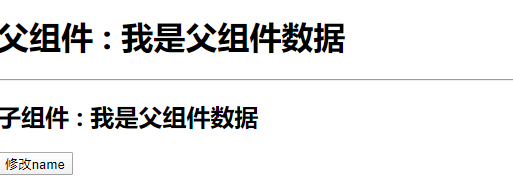
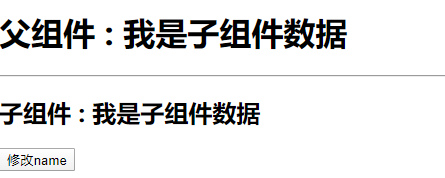
在 tpl2 子组件中,changeName 的方法只是改变了子组件的info, 但是因为对象的传递传递的是引用,因此实际上此时tpl1 的父组件的name也已经改动了
点击按钮 页面为:
3、完整的示例
<!DOCTYPE html>
<html lang="en">
<head>
    <meta charset="UTF-8">
    <meta name="viewport" content="width=device-width, initial-scale=1.0">
    <meta http-equiv="X-UA-Compatible" content="ie=edge">
    <title>Document</title>
</head>
<style>

</style>
<body>
        <template id="tpl1">
            <div>
                <h1>父组件 : {{info.name}}</h1>
                <hr>
                <tpl2 :info="info"></tpl2>
            </div>
        </template>

        <template id="tpl2">
            <div>
                <h2>子组件 : {{info.name}}</h2>
                <button @click="changeName">修改name</button>
            </div>
        </template>

        <div id="app">
            <tpl1></tpl1>
        </div>
</body>
<script src="https://cdn.jsdelivr.net/npm/vue"></script>
<script>
window.onload=function(){
    var app= new Vue({
        el:'#app',
        data:{
            info:{name : '我是父组件数据'}
        },
        template:'#tpl1',
        components:{
            'tpl2':{
                template:'#tpl2',
                props:['info'],
                methods:{
                    changeName(){
                        this.info.name = "我是子组件数据"
                    }
                }
            }
        }
    })
}
</script>
</html>